
Mobile Device Mounts and Accessories
Showing 13–24 of 34 resultsSorted by popularity
-
Mobile Device Mounts and Accessories

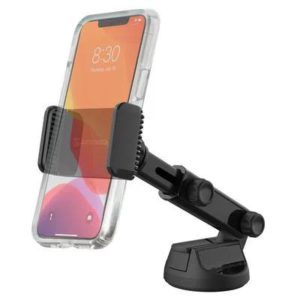
Scosche Extendo Mount Telescoping Window/Dash Phone Mount – UH4WDEX2-SP
 Mobile Device Mounts and Accessories
Scosche Extendo Mount Telescoping Window/Dash Phone Mount – UH4WDEX2-SP
- Scosche Extendo Mount telescoping window and dash phone mount, part number SIIUH4WDEX2-SP
- Base attaches to a windshield, dashboard or desk
- Extending arm with an adjustable, lockable angle
- Black clamp-type mount, universal fit
SKU: SIIUH4WDEX2-SP -
Mobile Device Mounts and Accessories
Scosche Dual 12V Adapter with Dual 12W USB Charger – DCLS242
- Scosche DCLS242 dual 12V adapter with dual 12W USB charger, part number SIIDCLS242
- Built-in circuitry guards against overcharging and overheating
- Power Delivery 3.0 fast charging support
- Universal fit, not tied to a specific vehicle
SKU: SIIDCLS242 -
Mobile Device Mounts and Accessories
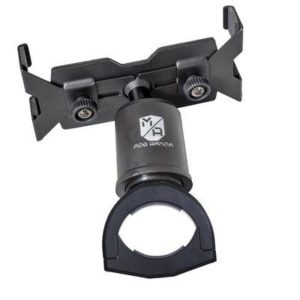
Mob Armor MOB X Tube – MOBT-X-BK-V2
- Mob Armor MOB X Tube tablet mount, part number MOBMOBT-X-BK-V2
- Two padded slide arms for most 7-10 inch tablets, with or without a case
- Ball housing for tilt, position and rotation
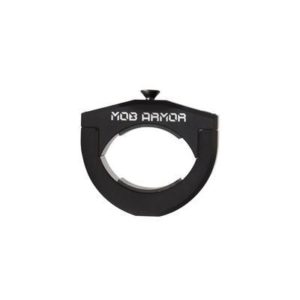
- Tube clamp assembly with three included inserts, universal fit
SKU: MOBMOBT-X-BK-V2 -
Mobile Device Mounts and Accessories
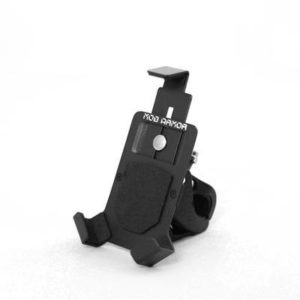
Mob Armor Mob Mount Small Switch Bar (Black) – MOBC2-BLK-SM
- Mob Armor Mob Mount Small Switch Bar in black, part number MOBMOBC2-BLK-SM
- Clamp mount for a roll cage, designed to hold a smartphone
- Combines the magnet and bar mounting options of the original Mob Mount
- Powder coat finish and universal bracket
- Universal fit; no specific vehicle.
SKU: MOBMOBC2-BLK-SM -
Mobile Device Mounts and Accessories
Mob Armor Mob Mount Gecko Mini Accessory – G-MINI-BK
- Mob Armor Gecko Mini suction cup mounting base, part number MOBG-MINI-BK
- Three suction cups for windshield mounting of smartphones
- Steel plate base that accepts the Mob Mount holder
- Black finish, universal fit
SKU: MOBG-MINI-BK -
-
-
-
-
Mobile Device Mounts and Accessories
Daystar Hands-Free Phone Grip (Black) – KU81001BK
- Daystar Hands-Free Phone Grip in black, part number KU81001BK
- Cupholder mount for most smartphones and their cases
- 360 degree rotation and full charger port access
- Polyurethane construction, made in the USA
SKU: DAYKU81001BK -
Mobile Device Mounts and Accessories

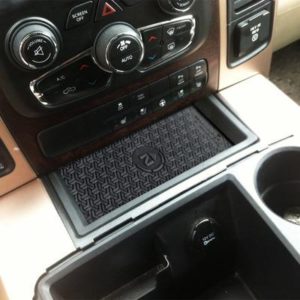
Brandmotion FreedomCharge MAX Universal Qi Wireless Charging Kit – FDMC-1310
 Mobile Device Mounts and Accessories
Brandmotion FreedomCharge MAX Universal Qi Wireless Charging Kit – FDMC-1310
- Universal-fit Qi wireless charging kit, part BRAFDMC-1310
- Updated triple coil charges through thick cases, including OtterBox
- Cut-to-fit design for most vehicle phone storage tray areas
- Black, inductive charging, smart phone device
SKU: BRAFDMC-1310 -
Mobile Device Mounts and Accessories
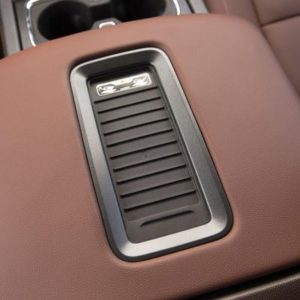
Brandmotion Center Armrest Qi Wireless Charging Kit – FDMC-1285
 Mobile Device Mounts and Accessories
Brandmotion Center Armrest Qi Wireless Charging Kit – FDMC-1285
- Retrofit Qi wireless charger for the armrest of select 2015–2018 GM vehicles
- Replaces the factory wireless module; supports iPhone 8 and newer
- Direct bolt-in with original connector, no wire splicing
- Part number BRAFDMC-1285, Brandmotion
SKU: BRAFDMC-1285






Keeping a phone usable on the trail
Phones double as GPS units, trail maps and cameras, and rough roads make a loose phone a nuisance. The products here hold a device where you can see it and keep it powered. The range goes from simple mounts to vehicle-specific charging pads built into the console.
Mount types
- Switch-bar and rail mounts: Clamp to a roll bar, dash bar or accessory rail, such as the compact switch-bar mounts in this category.
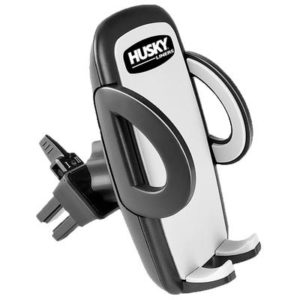
- Vent, dash and windshield mounts: Universal options that attach with clips or adhesive.
- Vehicle-specific mounts: Shaped to fit a model's dash or console, often with no drilling.
- Wireless charging kits: Pads built into an armrest or console that charge a compatible phone without a cable.
Pick a mount that grips firmly through bumps, allows adjustment, and does not block airbags, gauges or your view of the road. A mount should be placed where it does not interfere with deployment of an airbag.
Power and wiring
USB chargers plug into a power outlet and give one or two ports. Hard-wire kits connect to the fuse box or battery and provide a cleaner installation, usually with a USB port at the end of a cable. OBD-II splitters share the diagnostic port so that a monitor and a charger can both use it. Always check amperage, port type such as USB-A or USB-C, and the charging standard your phone supports.
What to compare
- Device size range, and case compatibility.
- Mounting style, clamp size or adhesive.
- Port types and charging output.
- Whether the product is universal or fits a specific vehicle.
- Wireless charging standard, such as Qi, and phone support.
Installation notes
Plug-in items are simple. Hard-wire kits require tapping a fuse circuit, so use an add-a-circuit fuse tap rated properly, choose a switched circuit so the charger does not drain the battery, and route cable clear of pedals and moving parts. Disconnect the battery when working with wiring if you are unsure. Wireless pads can leave some heat, so choose products with temperature protection and confirm that a thick case will not block charging.
Fitment
For vehicle-specific kits, confirm fitment for your exact year, make and model, and review the manufacturer's specifications. Laws on handling phones while driving vary by state, so check local regulations.
Matching a mount to your phone and vehicle
Measure your phone with its case on, since thick cases may be too wide for some holders. Consider the orientation you prefer, landscape for maps or portrait for calls, and whether the mount lets you rotate it. If your vehicle has a factory rail or roll bar, the diameter of the bar decides which clamp you need.
Mistakes to avoid and care
- Mounting on a surface that blocks an airbag panel or gauge.
- Using a long cable that dangles near the shifter or pedals.
- Leaving a phone in direct sun on a dash, which can cause overheating.
Rinse dust off the clamps and check the spring tension, since grip fades over time. Check connectors for corrosion if the vehicle is open to rain. Use a fuse tap with the correct amp rating for the circuit.
Popular Mobile Device Mounts and Accessories brands
- Mob Armor (17)
- Scosche Industries (14)
- Daystar (4)
- Rugged Ridge (3)
- Cobra (2)
- Brandmotion (2)
- Husky Liners (1)
Mobile Device Mounts and Accessories FAQ
Where should I mount my phone in a truck or Jeep?
Choose a spot within easy view that does not block your road view, airbags or controls. Roll bars, dash rails and vent mounts are common. Make sure the mount holds firmly over rough terrain.
What is a hard-wire USB kit?
It connects a USB port to the vehicle's fuse box rather than a cigarette-lighter outlet, giving a cleaner look and a dedicated power source. Use a properly rated fuse tap and a switched circuit to avoid battery drain.
Will wireless charging work through a thick case?
Often not, or only slowly. Thick, metal or magnetic cases can block or weaken the charge. Check the product's stated case thickness limit and your phone's charging standard.
Is it legal to mount a phone on the windshield?
Rules differ by state, and some restrict where devices may be placed. Check local regulations before mounting, and place any mount where it will not obstruct your view of the road.