
Overview
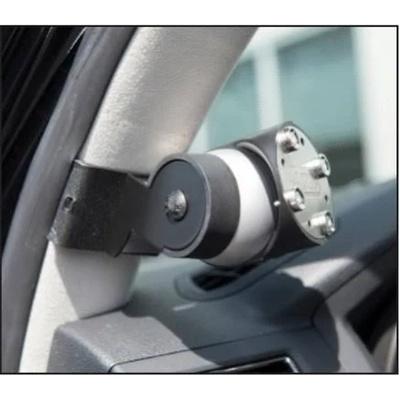
The ARB 7450110 is the LINX A-Pillar Bracket Kit 2, a black aluminum bracket that mounts the ARB LINX display screen on the vehicle’s A-pillar. The A-pillar is the roof support beside the windshield, and the bracket places the screen in an easy-to-reach location.
ARB says its LINX Vehicle Accessory Interface has a range of components and hardware kits that help integrate it with your vehicle and chosen accessories. This bracket is designed to suit a large range of popular 4x4s. It uses the LINX gimbal mount, so the display can be set to the position you want and returned to the same position each time.
Key features
- Mounts the LINX display screen at the A-pillar
- Works with the LINX gimbal mount to set the display angle
- Black color
- Aluminum material
- Part of ARB’s LINX accessory range
- Designed to suit a large range of popular 4x4s
- Fit is universal, with no specific vehicle named
Mounting and wiring
A display mounted on the A-pillar sits in the driver’s line of sight, so placement matters as much as the bracket itself. Choose a spot that keeps the screen clear of airbag deployment zones and does not block the windshield view. Test the angle from the driver’s seat with the vehicle parked, and adjust the gimbal until the screen is readable without leaning.
Wiring for a screen should be planned before the bracket is tightened. Route cables along existing trim paths and away from pedals, steering and moving parts. Use correctly rated fuses and disconnect the battery before connecting electrical accessories. Recheck the bracket and gimbal fasteners after the first drives, since vibration can loosen them over time.
- Mark the mounting position before drilling or fastening
- Keep spare fuses of the correct rating on hand
- Store cable slack neatly behind trim
Specifications
| Brand | ARB 4×4 Accessories |
|---|---|
| Part number | 7450110 |
| Product type | A-pillar bracket kit for the LINX display |
| Color | Black |
| Material | Aluminum |
| Fit type | Universal fit (as listed) |
Vehicle fitment
The bracket is designed to suit a large range of popular 4x4s and carries a universal fit. No specific vehicle, years or chassis code are named, so confirm fit before ordering.
A-pillar shapes differ between vehicles. Confirm the bracket suits your vehicle’s A-pillar, and confirm your vehicle’s year, model and trim before ordering.
Installation notes
Follow the fitting steps before mounting the bracket. Keep the display clear of airbag deployment zones, controls and your view of the road, and route any wiring away from moving parts.
Disconnect the battery before connecting any electrical accessory, and use correct wiring and fusing. Re-check that the bracket and gimbal mount are tight after the first miles of driving, and follow local regulations for mounting screens in the vehicle.
What’s included
- LINX A-Pillar Bracket Kit 2
Not included: the LINX display screen and gimbal mount, which are separate LINX components.